Canva Website Builder in 2026: AI Features, Domains, Limits and Cost
By Ethan Halfhide · Updated September 30, 2026
Last verified 2026-09-30
Canva's website builder turns a Canva design into a published, mobile-responsive site. It is free: Canva Free publishes up to five websites on a my.canva.site address, with a "Designed with Canva" footer and 10 sections per page. Canva Pro (US$144 a year as of September 2026) adds unlimited sites, your own domain and site analytics. Figures below come from Canva's pricing page and help center, checked September 30, 2026.
 Canva
CanvaTL;DR: Top pick
Canva: Canva publishes any Website design as a responsive site. Canva Free covers up to five live sites on my.canva.site with a Canva footer; Pro removes the footer, adds unlimited sites, lets you connect up to five of your own domains and turns on Website Insights. There is no online store.
Canva's website builder at a glance
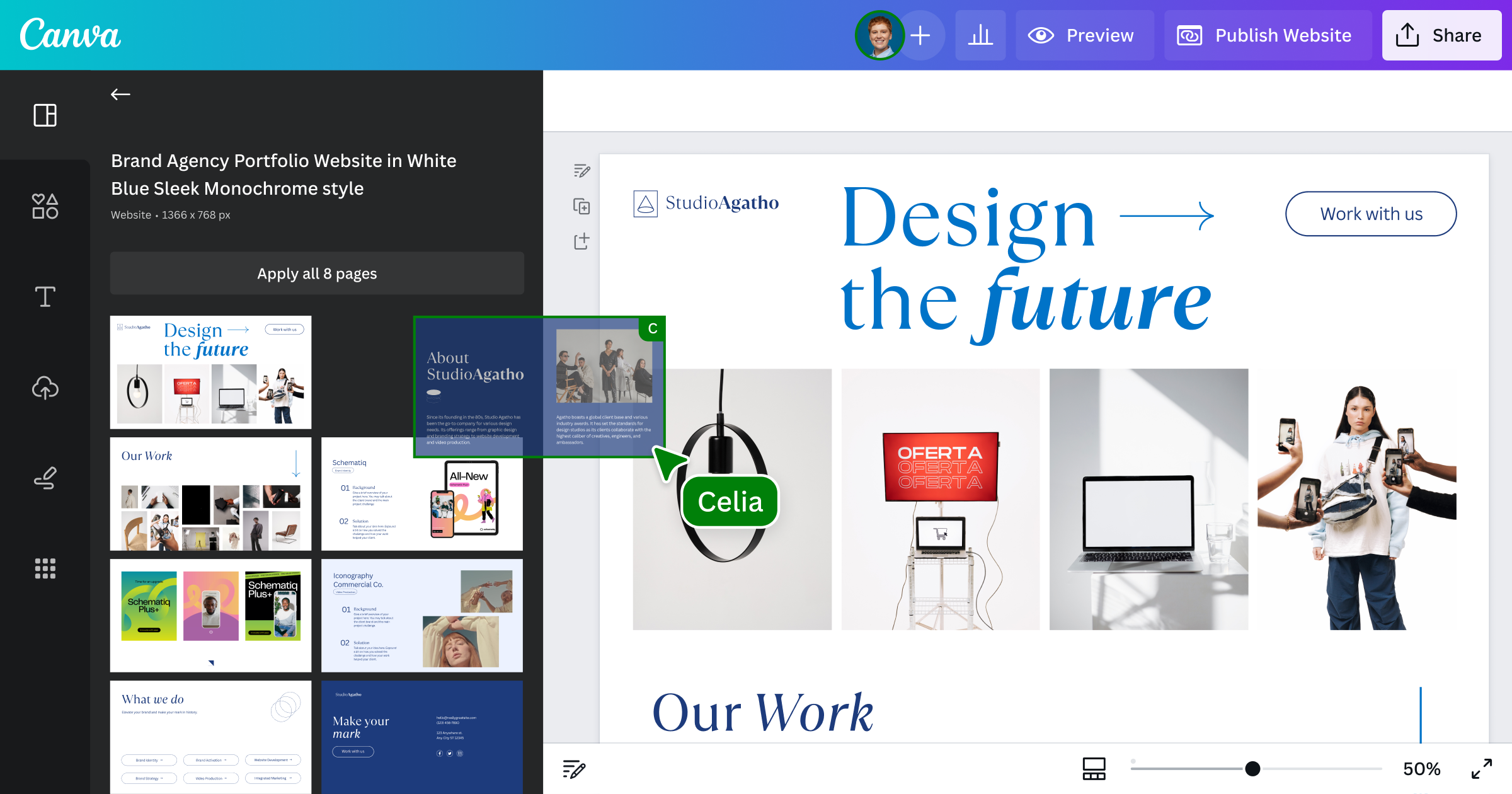
Canva's website builder is the Website design type inside the normal Canva editor. You start from a website template or a blank Website design, add sections and pages, and select Publish website. Sites can be one page (landing pages, portfolios, event pages, link-in-bio pages) or multi-page, up to 45 pages. Canva's AI tools work inside the same editor: Magic Write drafts copy, Canva AI generates images and editable designs from a prompt, and Canva Code builds interactive pieces such as pricing calculators or countdown timers that you can publish as a website or add to one. Publishing is included on every plan, SSL is included on every site, and hosting is on Canva. The trade-offs are the limits: no online store, basic SEO settings, five live sites on Canva Free, and custom domains only on paid plans.
Pros
- +Free plan publishes up to five live websites on a my.canva.site address
- +Same editor, templates, stock library and Brand Kit you use for other Canva designs
- +Every published site includes an SSL certificate
- +Canva Code can add AI-built interactive pieces (calculators, countdown timers, games) to a site
- +Pro connects up to five domains you already own, or you can buy one inside Canva
Cons
- −No online store: Canva says e-commerce is not supported
- −Free sites show a "Designed with Canva" footer and publish only 10 sections per page
- −Basic SEO only: site and page titles, descriptions, custom URL paths and a favicon
- −Website analytics are not on Canva Free
- −Link in Bio and mobile website designs publish only to canva.link and cannot use a custom domain
Side-by-side comparison
| Canva plan | Price (as of September 2026) | Websites on the free my.canva.site domain | Connect a domain you already own | Sections you can publish per page | Website Insights (analytics) | Monthly AI allowance (pricing page) |
|---|---|---|---|---|---|---|
| Free | US$0 | Up to 5 live websites | No | 10 (you can design 20) | No | Up to 20 Standard or Premium AI uses |
| Pro | US$144 a year for one person | Unlimited | Up to 5 domains | 20 | Yes | Up to 200 Premium AI uses or 20 Ultra AI uses |
| Business | US$250 a year per person | Not stated for the free domain; unlimited on connected domains | Up to 5 domains | 20 | Not listed in Canva's insights help article | Up to 400 Premium AI uses or 40 Ultra AI uses |
| Education (K-12) | For eligible schools, teachers and students | Unlimited | 1 domain at a time | 20 | Yes (teacher approval needed) | Not stated on the pricing page |
How the Canva website builder works
Canva's help center describes two starting points: search the templates for "website" and customize one, or choose Website from the recommended categories and select Create a blank Website. From there you add text, photos, videos, graphics, charts or embeds from the side panel, use Add section to add blocks to a page and Add page to create more pages. Each page gets its own address on the same site, and multi-page sites can have up to 45 pages. You can animate pages and elements, link text or elements to other pages in the document, and turn on a navigation menu with its own colors, fonts, items and logo. When you are ready, select Publish website, pick the site address, review Settings (resize on mobile, navigation menu, title and favicon, password protection, search engine visibility and the social media link preview) and publish. You can keep editing after the site is live and republish to update it. If you design something that is not a Website design, Canva asks you to resize it into a website before publishing.
Which Canva AI features work on websites
Canva's website builder page says its AI tools can "generate stunning visuals, instant copy, and interactive widgets", and its free plan feature list names Magic Write for SEO. Here is what Canva documents for each tool. Magic Write is Canva's AI text generator, powered by OpenAI. Canva lists website copy and landing page copy among its uses, says it works across all Canva designs on Free, Pro, Teams and Nonprofits accounts in 20 languages, and says it is not available to students on Canva for Education. Canva Code turns a description into an interactive experience, such as a pricing calculator, countdown timer or game, which you can publish as a live website with its own URL or add to an existing website design as an embedded element or a new Code page. You can also upload an HTML or code file and turn it into an editable Canva design, and responses can be collected in a connected Canva Sheet. Canva AI (Canva AI 2.0 is listed as a new feature on Pro and Business) is a chat assistant that creates fully editable designs, text and images from a prompt, and it can connect to tools such as Slack, Gmail, Google Drive and Notion. The pricing page also lists a Form Generator, Magic Resize, Magic Animate and Translate. Canva Code is the closest Canva gets to prompt-to-site: its page says you can "whip up an interactive website or tool" and publish it in one click. For a regular multi-page Website design, the documented path is still a template or blank design that you edit, with AI tools helping inside it.
AI usage limits by plan
Canva sorts its AI tools into Standard, Premium and Ultra tiers that draw on a shared monthly allowance. On paid plans, Standard AI tools such as Magic Write and Translate can be used "abundantly" and do not count toward the allowance, subject to fair use limits. Canva Code, the Form Generator and design generation with Canva AI are Premium AI tools. Canva's estimates are up to 20 Standard or Premium AI uses a month on Canva Free (no Ultra AI), up to 200 Premium or 20 Ultra uses on Pro, and up to 400 Premium or 40 Ultra uses on Business. Canva says complex tasks use more of the allowance, so real numbers may be lower. A free trial of Pro or Business gets the same AI allowance as Canva Free until it converts to a paid plan. If you need more, Canva sells an AI Pass add-on for Pro and Business and one-time AI top-ups for Business.
Domains and publishing
Free Canva domain. Website designs publish to a my.canva.site address, and you can edit the subpath to customize the URL. Canva will not reuse a free domain name another brand has used before. Link in Bio and mobile website designs are different: they publish only to a canva.link address and cannot use a custom domain. Your own domain. Canva Pro, Teams and Business users can connect up to five domains they already own, and Education users one at a time. Canva connects the domain automatically if your provider supports it, or you update the DNS settings by hand; verification can take up to 72 hours. Subdomains such as blog.example.com work, and you can publish unlimited websites on connected domains using subpaths. Buying a domain in Canva. Canva's domain search lets you register a domain on the web (not in the iOS or Android apps). Canva resells Tucows domains, registrations last one year and renew automatically, and you must verify your contact details within 16 days or the domain is suspended. Extensions include .com, .net, .org, .shop, .store, .site and 25 others, and prices vary by extension. Canva's website builder page says a domain can cost between $10 and $20 a year. Canva adds Whois privacy protection, and every published Canva website includes an SSL certificate.
Limits worth knowing before you start
No store. Canva's website hosting page says e-commerce is currently not supported and that there is a storage limitation. For selling online, compare the best AI website builder for ecommerce instead. Basic SEO. Canva describes its SEO settings as basic: a site title, meta description and favicon, plus a title and custom URL path for each page. You can turn search engine visibility off to hide the site from Google. Free plan limits. Canva Free publishes up to five live websites, only 10 sections per page (you can design 20), and shows a "Designed with Canva" footer with Canva's privacy policy that you cannot remove. Analytics. Website Insights shows visits, visits by page, country, device, traffic source and link clicks, but only on Pro, Teams and Education according to Canva's help article. Insights does not use cookies or IP tracking, so Canva says it cannot count unique visitors accurately. Canva Pro and Teams users publishing on a custom domain can also connect Google Analytics. Plan names. Canva Teams is closed to new sign-ups, and Canva now points teams to Canva Business.
Which Canva plan fits a website
Canva Free is enough for a single event page, portfolio or landing page if a my.canva.site address and the Canva footer are acceptable and each page fits in 10 sections. Canva Pro (US$144 a year for one person, as of September 2026) is the plan for a real business site: it removes the footer, publishes unlimited sites, connects up to five of your own domains, turns on Website Insights and raises the AI allowance. Canva Business (US$250 a year per person) adds team tools, 100 Brand Kits, approvals and a larger AI allowance; it only matters for websites if several people publish sites together. Nonprofits can get Canva's premium features free for one team of up to 50 people, and Canva Education is for eligible K-12 schools. Prices exclude tax, and Canva says yearly billing saves from 16%.
Who Canva's website builder suits
It suits people who already design in Canva and want a good-looking one-page or small multi-page site fast: freelancers and creatives showing work (see our AI portfolio website builder guide), event organizers, teachers, and small businesses that need a landing page, menu or contact form. It is a weaker fit if you need an online store, a blog, deeper SEO control, or a site that will grow into a larger business platform. For single-page campaigns, compare other tools in our AI landing page builder guide.
How Canva compares with Wix, Squarespace and other AI builders
Wix is the closest free alternative: it publishes free sites on a wixsite.com address, and a Premium plan removes Wix ads and connects your own domain. Our Wix AI features review covers its AI builder, and Wix vs Squarespace compared weighs the two full platforms. Squarespace has a 14-day trial rather than a free plan, and it includes free invoicing on all plans; our Squarespace AI website builder guide explains its Blueprint AI and credit system. Framer and Webflow both have free plans with design-focused editors, and Framer's Basic plan adds CMS collections and a free custom domain. Durable writes a whole small business site with AI, and its paid Launch plan includes a free domain up to a $20 value. For the wider field, see our list of the best AI website builders or, if you do not want to pay at all, the best free AI website builders.
What we don't know
Canva's pricing page shows yearly prices (US$144 for Pro, US$250 per person for Business) but the monthly prices load separately and we could not confirm them, so we have left them out. Canva's pages suggest Canva Free users can buy a domain inside Canva (the free-domain article tells them to "purchase domains or upgrade" to publish more, and connecting a domain you already own needs Pro), but no page states it outright. Check inside the Publish panel before you buy. Canva's website insights article names Pro, Teams and Education but not Business. Canva does not say exactly how much of the AI allowance one Canva Code or Form Generator request uses, or what the storage limit for websites is. Canva's website help articles do not describe exporting a published site as HTML.
How this page was put together
We compared Canva's published website builder page, pricing page and help center articles, plus the official pricing and help pages of the alternatives listed, all loaded on September 30, 2026. We did not build a site with Canva for this page. Prices are in US dollars as shown on those pages, exclude tax and change often, so check the linked source before you buy.
Canva and the alternatives worth comparing
- 1CCanva
Design platform with an AI-assisted website builder
Canva publishes any Website design as a responsive site. Canva Free covers up to five live sites on my.canva.site with a Canva footer; Pro removes the footer, adds unlimited sites, lets you connect up to five of your own domains and turns on Website Insights. There is no online store.
- Best for:
- Simple brochure, event, portfolio and landing page sites made by people who already design in Canva
- Pricing:
- Free plan. Pro US$144 a year, as of September 2026
- 2WWix Harmony
Vibe coding welded onto Wix's visual editor and hosting
Wix lets you build and publish for free on a siteprefix.wixsite.com address with 500MB storage and 1GB bandwidth, and you can create up to 999 free sites. Removing Wix ads or connecting your own domain needs a Premium plan.
- Best for:
- A free site on a larger all-in-one platform
- Pricing:
- Free plan. Premium plan for your own domain
- 3SSquarespace
The most polished AI website builder for creatives and brand-conscious businesses
Squarespace offers a 14-day free trial and no free publishing plan. Basic is $19 a month billed yearly ($25 month to month) as of September 2026, and annual plans include one year of free domain registration.
- Best for:
- Design-led business sites with commerce and scheduling
- Pricing:
- 14-day trial. Basic $19/mo billed yearly, as of September 2026
- 4Framer
Design and publish sites at the speed of thought
Framer's free plan includes 500 AI credits to try and a free Framer domain. Basic adds a free custom domain and 1,000 AI credits a month.
- Best for:
- Designed marketing and portfolio pages
- Pricing:
- Free plan. Basic $10/mo billed yearly, as of September 2026
- 5Webflow
Build production websites without writing code
Webflow's free Starter plan publishes to a webflow.io address with 2 static pages. Publishing to your own domain needs a paid site plan.
- Best for:
- Sites that will need a real CMS later
- Pricing:
- Free Starter plan. Paid site plans for a custom domain
- 6DDurable
Build a website in 30 seconds with AI
Durable's free plan includes a website with 5 AI images and 10 AI chat messages a month. Launch lets you connect your own domain or register one free, up to a $20 value.
- Best for:
- Local service businesses that want AI to write the site
- Pricing:
- Free plan. Launch $25/mo, as of September 2026
- 7HHostinger Website Builder
AI website builder with a 14-day free trial; Premium from $2.99/mo on a 48-month term (Sept 2026)
Hostinger's builder is not free but has a 14-day trial. As of September 2026 the Premium plan is $143.52 for the first 48 months (regular price $575.52), renews at $10.99 a month and includes 5 AI credits.
- Best for:
- A low-cost hosted site with email and a domain
- Pricing:
- 14-day trial. Premium renews at $10.99/mo, as of September 2026
Verdict
Canva's website builder is the quickest route to a clean, simple website if you already design in Canva, and the free plan is genuinely usable for up to five small sites. Budget for Pro (US$144 a year as of September 2026) if you want your own domain, no Canva footer and analytics. Its AI mostly works inside the editor, helping with copy, images and interactive Canva Code pages rather than building a full multi-page site for you, and it has no store and only basic SEO. If you need to sell online or plan to grow the site, start with Wix or Squarespace instead; for a free site with more room to grow, look at Framer or Webflow.
Frequently asked questions
Sources
- Canva website builder
- Canva pricing
- Canva Help: Canva Websites overview
- Canva Help: Design websites using templates or from scratch
- Canva Help: Publish websites to a free domain
- Canva Help: Use your own domains to publish websites
- Canva Help: Purchase domains to publish websites
- Canva Help: Website settings and page customization
- Canva Help: Website analytics and insights
- Canva Help: Set up Google Analytics for your Canva website
- Canva free website hosting
- Canva Domain Name Search
- Canva Code (AI code generator)
- Canva AI assistant
- Canva Magic Write
- Canva Help: Upgrade to Canva Pro or Business
- Wix Help: Building a website for free
- Squarespace pricing
- Framer pricing
- Webflow pricing
- Durable pricing
- Hostinger website builder
Keep reading
- Canva listing and details →
- Best AI website builders →
- Best free AI website builders →
- Squarespace AI website builder →
- Wix AI website builder review →
- Wix vs Squarespace compared →
- AI landing page builder guide →
- AI portfolio website builder guide →
- Best AI website builder for ecommerce →
- Best AI website builder for small business →
About the author
Ethan Halfhide
Ethan Halfhide is an AI technologist and founder who has helped more than a thousand people build websites and products with AI tools. He compares AI website builders on pricing, features and what each one actually produces from a prompt.